On-Body Calibration:
This calibrates the sensors to the environment. The sensors will determine if it is needed, so you only need to do it when prompted.
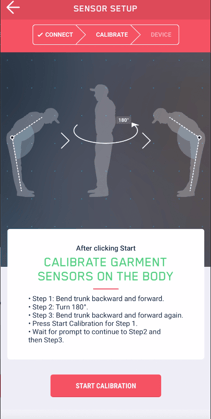
When prompted for On-Body Calibration perform the following procedure while wearing the 3D Smart Shirt. Make sure your sound is on and audible.
-
At the beep, bend your knees, lean slightly back, then bend at the waist forward until you hear another beep.
- Tips: The system is looking for 45 degrees of forward bend of the pelvis. Bending your knees and extending before bending can help you achieve the target bend. It allows your pelvis/hips to achieve the forward bend even if you have a tight back or hamstrings. You can do the forward bend quickly. The beep will indicate you have hit the threshold.
-
After you heard the beep, simply stand straight and turn 180° to face the opposite direction. You will hear another beep indicating success of the turn.
-
Then repeat the “toe touch” bend, leaning back and bending forward until you hear the next sound.
- On-Body Calibration Complete!
User Pose Calibration:
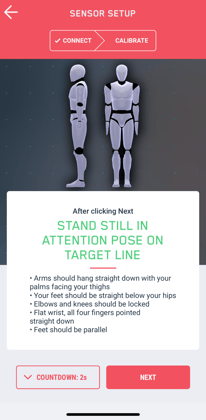
This calibrates the sensors to your body when you are wearing the shirt.
-
Stand up straight at your target line. This sets the target direction for your Bio-feedback training session.
Tip: If you change your target/direction, you can press the Redo user pose button on the top right of the screen. This will reset the rotation boxes to zero. -
Hold your pose until you hear the beep
Redo On-Body Calibration
If you notice unnatural body movements or unrealistic analysis results, repeat the on-body calibration.
From the Home screen:
-
Select the Redo Body Calibration checkbox.
-
Select Analysis or Training.
-
Follow calibration instructions
During Biofeedback Training:
If your garment has shifted on your body, repeat the User Pose Calibration to ensure accurate captures.
-
Tap the Sensor icon
 at the top right corner of the Training screen.
 -
Stand in the attention pose during the 3 sec countdown.
-
The user pose is reset.
If you notice that the avatar doesn't move realistically during training, press the  (standing man symbol) in the upper right corner to repeat the body calibration.
Tip: If you cancel a calibration, the garment cannot be recalibrated straight away.
The sensors need to reach a stable state to re-initiate calibration.
This error message warns you of the time that needs to pass before the next calibration attempt: "The sensors are still in calibration mode from a previous calibration attempt. Please wait 30 seconds and try again!"